Citation Customer Name Inquiry

Contents
The Citation Customer Name Inquiry is used to look up a citation tracking customer by their name. The name inquiry may be made by the cited company or by a cited person's name.
To process a Citation Customer Name Inquiry
From the Dashboard Go To ..... |
Steps to Follow ..... |
||||
|---|---|---|---|---|---|
Transaction Menu |
|
||||
Direct Command Line |
|
1. Enter the full or partial name of the company or the name of the person cited (Last,First,M) in the Customer Name field on the Citation Customer Name Inquiry and click the Inquire  button.
2. mySelect will display a list of customer numbers and names matching (or closely matching) to any in the Citation Tracking System in the Customer Information grid. If needed, use the Scroll Bar (on the right) to scroll down through the list.
To see additional information of a customer, click the  next to that customer to expand and display the information.
 |
| Click to view full size |
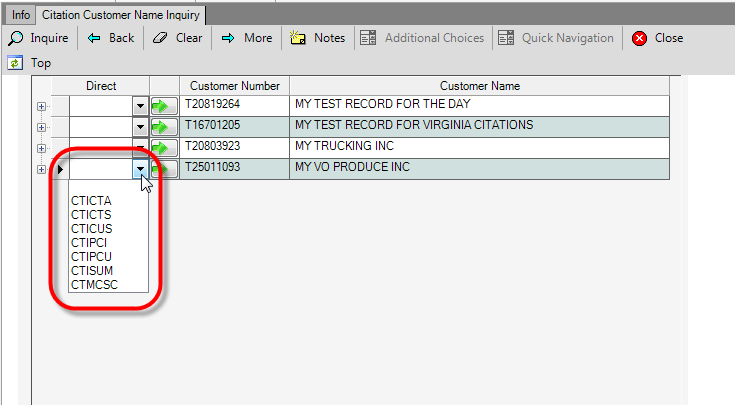
3. To navigate to one of the following screens, click the down arrow  button in the Direct column and make a selection.
Code |
Screen |
CTICTA |
All Citations For Customer |
CTICTS |
Suspended Citations For Customer |
CTICUS |
Citation Tracking Customer Establishment |
CTIPCI |
Citation Payment Inquiry by Citation Number |
CTIPCU |
Citation Payment Inquiry by Customer Number |
CTISUM |
Citation Summary Inquiry by Customer Number |
CTMCSC |
Citation Tracking Payment |
 |
| Click to view full size |
4. Click the green arrow  to launch the form.
5. Click the Close  button to close the transaction.