Suspended Citations For Customer

Contents
To view suspended citations associated with a Citation Tracking Customer, use the Suspended Citations For Customer transaction.
To view the Suspended Citations for a Citation Tracking customer
From the Dashboard Go To ..... |
Steps to Follow ..... |
||||||
|---|---|---|---|---|---|---|---|
Transaction Menu |
|
||||||
Direct Command Line |
|
1. Enter one of the following in the Customer Number field.
| • | IFTA License Number |
| • | MC Number |
| • | US DOT Number |
| • | Driver's License Number |
| • | FEIN/SSN |
| • | IRP Account Number |
| • | Citation Tracking Customer Number |
2. In the Citations option, select the option representing the type of citations you would like to see.
Option |
Result |
All |
Displays all citations. |
Motor Carrier |
Displays only citations associated with Motor Carrier violations - Intrastate Operating Authority, IFTA, IRP, etc. |
Overweight |
Displays only overweight citations. |
3. Click the Inquire  button. The Suspended Citation For Customer transaction form opens.
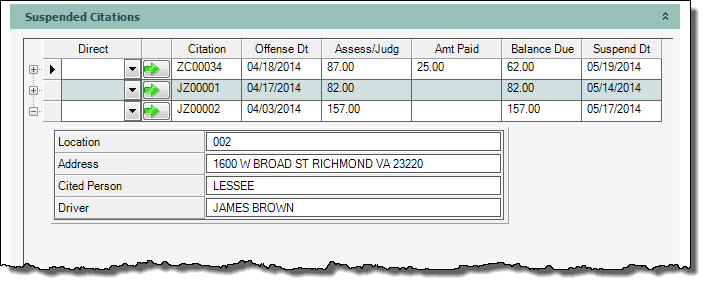
To see more detail about a suspended citation, scroll down to the Suspended Citation section. Click the  next to the citation to expand the screen and display additional information.
 |
| Click to view full size |
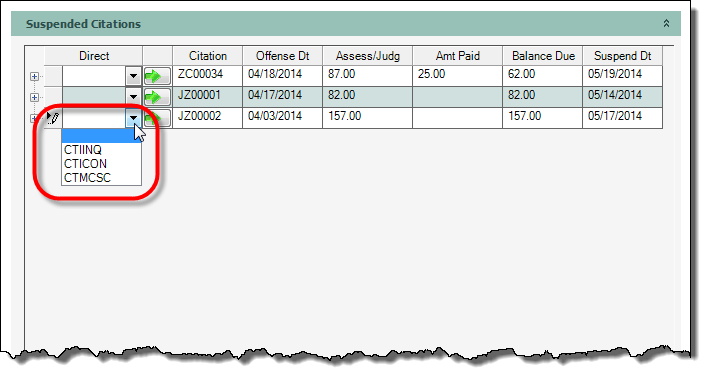
To navigate to one of the following screens, click the down arrow  button in the Direct column and make a selection.
 The CTIINQ option will take you to either the Overweight Citation or the Motor Carrier Citation Inquiry depending on which citation is selected.
Code |
Screen |
CTIINQ |
Overweight Citation Inquiry by Citation Number |
|
Motor Carrier Citation Inquiry |
CTICON |
Contested Case Inquiry |
CTMCSC |
Citation Tracking Payment |
 |
| Click to view full size |
Click the green arrow  to launch the form.
4. Click the Close  button to close the transaction.
If more options are needed, click the  button from the transaction's button bar, to navigate to one of the following:
| • | All Citations for Customer |
| • | Citation Contest Inquiry |
| • | Citation Customer Name Inquiry |
| • | Citation Summary Inquiry by Citation Number |